Legend
This is an example of using pplt.legend.
Note
If you want to disable the border for the default style you can simply rely on the matplotlib parameter and pass frameon = False to the method, for more parameters check out matplotlib.pyplot.legend.
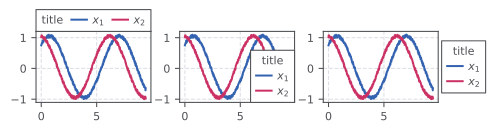
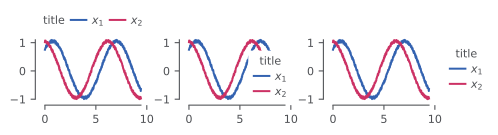
import numpy as np
import prettypyplot as pplt
from matplotlib import pyplot as plt

# define random data to plot
np.random.seed(1337)
N = 500
T = np.linspace(0, 3 * np.pi, N)
X1, X2 = [
    np.sin(T + np.pi * np.random.rand()) + 0.1 * np.random.rand(N) for _ in range(2)
]

# loop over  random data to plot
for style in ['default', 'minimal']:
    pplt.use_style(style=style, figsize=1.2)

    fig, axs = plt.subplots(1, 3, gridspec_kw={'wspace': 0.25})

    # legend
    for i, outside in enumerate(['top', False, 'right']):
        ax = axs.flatten()[i]
        pplt.plot(T, X1, ax=ax, label='$x_1$')
        pplt.plot(T, X2, ax=ax, label='$x_2$')

        pplt.legend(title='title', ax=ax, outside=outside)

    pplt.savefig(f'images/legend_{style}.svg')
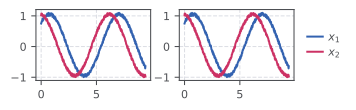
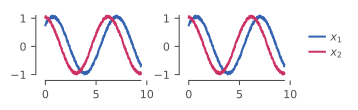
Deduplication across a 1×2 subplot grid
When the same series is plotted in multiple panels, passing axs collects all
handles and labels from every axis — and duplicate entries (same label and
same visual appearance) are removed automatically before the legend is drawn.
for style in ['default', 'minimal']:
    pplt.use_style(style=style, figsize=1.2)

    fig, axs = plt.subplots(1, 2, gridspec_kw={'wspace': 0.25})

    # plot the same series in both panels — labels appear twice in each axes
    for ax in axs:
        pplt.plot(T, X1, ax=ax, label='$x_1$')
        pplt.plot(T, X2, ax=ax, label='$x_2$')

    # collect handles from both axes; duplicates are removed automatically
    pplt.legend(outside='right', axs=axs)

    pplt.savefig(f'images/legend_dedup_{style}.svg')